
How to Convert PDF to Slides Quickly and Easily in 2025
Converting PDF into PowerPoint slides used to be a very lengthy procedure. First copy the text, then do manual formatting and build the layout. It is so exhausting and drains mental energy. However, AI-powered tools like Tera AI Presentation Maker are changing how we work with documents.
They don’t just transfer text, they transform static PDFs into editable, visually appealing slides in minutes. What used to cause exhaustion now can be done in a cleaner, smarter, and faster way. With the help of AI, you can easily turn lengthy reports, research papers, or presentations into stunning decks with a few clicks.
In this article, we will explore why PDF-to-PPT conversion can be tricky, how AI simplifies the process, and provide a step-by-step guide on how to do it convert PDF to slides with TeraBox.
Part One: Why convert pdf to slides
Turning a PDF file into PPT might sound simple, but it’s often not. Here is why you should avoid manual work.
Formatting Issues
The purpose of a PDF is to read the text. It is not meant for editing. Therefore, when you convert it into slides, you need to do immense editing regarding the font, layout, and spacing. Some elements may even disappear. Hence, it takes a lot of time and energy to fix such issues.
Graphics Misplacement
Images, charts, or logos can shift slightly from their original position during the conversion process. This often happens when the PDF has too many overlapping layers, tight spacing, or non-standard image formats.
Text Consuming Adjustment
Making so many adjustments can cause mental struggle and loss of energy. Especially performing the same task, like fixing the spacing repeatedly, is so time consuming. That’s where AI steps in to handle all of these details for you.
Part Two: Who Can Benefit from PDF to slides Conversion
AI-powered tools like make collaboration smoother than ever. Here are five ways to enhance your workflow with AI conversion features:
1. Companies
Turn lengthy research papers or company reports into slide decks in seconds. Perfect for meetings and reviews.
2. HR and Education Teams
HR and education teams can easily convert training materials into visually engaging slides using AI.
3. Teams
Multiple team members can edit and review converted slides together on the TeraBox cloud. It’s fast and organized.
4. Brands
AI keeps fonts, colors, and logos consistent across slides, no more manual editing or design errors.
By turning static documents into dynamic slides, AI bridges the gap between content creation and visual storytelling.
Part Three: How to Convert PDF to Slides Quickly and Easily with Terabox: Step-by-Step GuideI
With AI, you can turn your PDFs into PPTs very quickly. Especially with TeraBox, the process is a lot easier and straightforward. Here is how you can do it step by step.
Log in to TeraBox
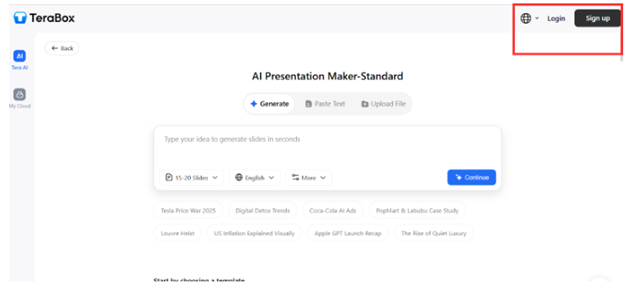
First, navigate to the browser and search for the TeraBox presentation maker. Open and log in or sign up for an account.
Upload Your File
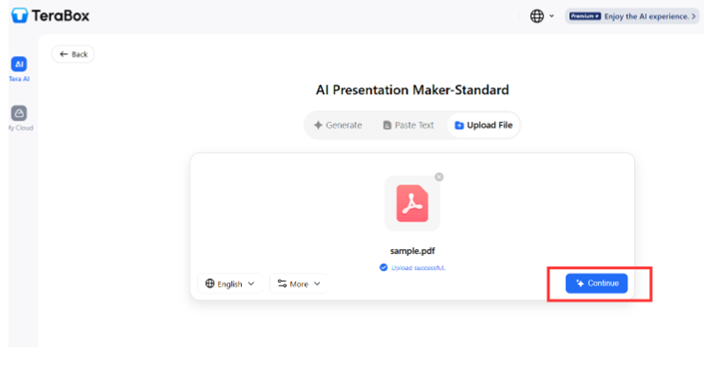
Select your PDF file and upload it for the conversion. You can either simply drag and drop the file or upload from the device. Once uploaded, click “Generate”.
Let AI do the Magic
Now the AI will start the procedure. It will then analyze the structure and text, after which it will give you an outline with all the key headings. You can add another section if you want, or go with the suggested ones only. Click continue.

Preview and Edit
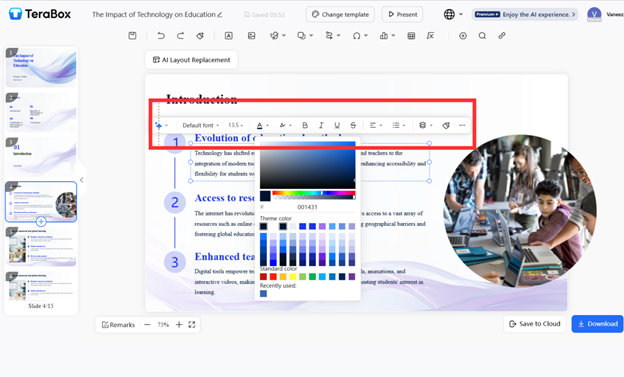
Once it has successfully generated, you can have a preview before downloading. Here you can make small modifications like change color, fonts, or layout.
Download or Share
After you are satisfied with the results, click on the download button to download it or share it with team members directly from the platform. You can also store it in the TeraBox cloud storage, which is easily accessible from anywhere.
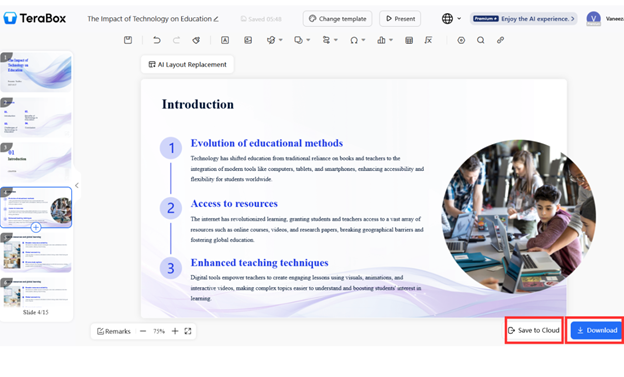
That is it, your static PDF is now a beautiful, editable PowerPoint deck ready to present.
Part Four: Advanced Features of Terabox for PDF to Slides Conversion
AI isn’t just about automation. It’s about intelligence and creativity working together.
A PDF-to-PPT converter analyzes the structure of your PDF, headings, images, text boxes, and tables, and rebuilds them in PowerPoint format automatically.
1. Understands the layouts
The presentations should make sense. The AI analyzes the entire PDF provided by you and ensures everything is in its place, including the images, fonts, headings, and even spacing. Hence, there is no need for manual adjustments; your PDF gets converted into slides with everything neat, clean, and organized.
2. Preserve Quality
People often worry about the image quality during the conversion. However, with Advanced AI driven tools, you should not be tense. It ensures the quality is maintained and the image is sharp and clear. Therefore, unlike other tools that lower the quality with blurred results, it boosts professionalism.
3. Saves Time
Copy past repeat, manual work is so tiring. However, AI saves immense time by doing all of the work within just a few seconds. You don’t have to perform tasks repeatedly that used to be very boring; instead, save the energy and put it into other important tasks. Hence, this increases productivity and efficiency.
4. Custom Design Suggestion
With AI, you work smarter, not harder. It gives smart design suggestions, like better font pairings or image placement. If a slide feels too crowded, the AI recommends a cleaner layout. This way you don’t have to think much or put pressure on your mind. It ensures your presentation not only stays accurate but also looks very modern and engaging.
5. Focus on What Matters
With AI, you don’t have to care about performing boring tasks again and again. By saving you a lot of time, it allows you to focus on what really matters, your ideas, story, and confidence while presenting.
Part Five: Troubleshooting Common Issues When Converting PDF to slides
AI has brought about a great revolution in the digital era. It helps us work smart and efficiently. However, one should always remember that it is for our assistance and we should not heavily depend on it. Here are some issues you might be facing when converging PDFs to Slides.
1. Line Break Misinterpretation
Sometimes, AI tools don’t correctly detect where a paragraph ends or a new one begins. Therefore, the paragraphs sometimes merge into one. This leads to awkward sentence breaks.
2. Page Order Mix-Up
When you convert PDFs to PPTs, the slides can appear in the wrong order. This disrupts the original flow of your content. It usually happens when a PDF has many mixed page orientations or custom numbering that the AI reads incorrectly.
5. Header and Footer Confusion
PDFs with repeated headers or footers may confuse AI tools. This causes the elements to appear awkwardly in the main slide content. This can distract from your core message.
Conclusion: Work Smarter, Present Better
AI has truly redefined how we create presentations. We have passed the era where AI was only about automation. Today, it is about collaboration and creativity. AI driven tools help professionals put their time into things that actually matter, such as creativity and ideas, rather than being exhausted with the formatting.
Now, you can learn how to convert pdf to ppt using AI and get it done in minutes instead of hours. TeraBox has made the process further easy. It is very simple, fast, accurate, and turns everyday PDFs into editable, professional-quality presentations.
Whether you’re doing pdf to ppt conversion for a report or for a pitch deck, TeraBox delivers consistency and precision every time.AI helps be more efficient, fast, and productive. Hence, it allows you to present your ideas more effectively than ever before.